Health & Fitness
Create photo books and holiday cards just in time for the season!
Learn how to create holiday photo books and cards just in time for the season using iPhoto on your Mac!
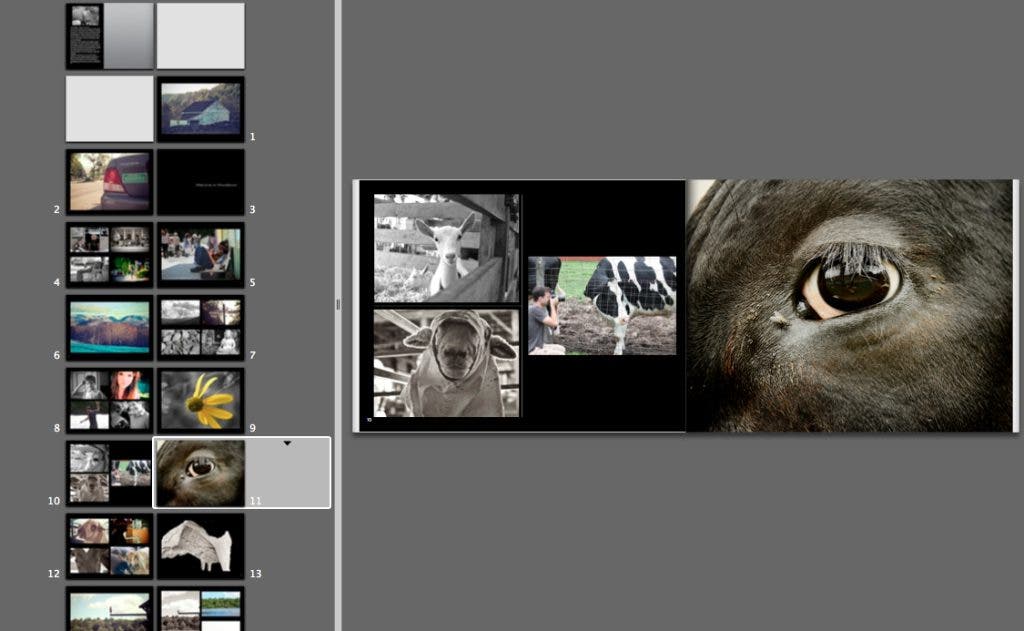

One of my favorite gifts to give to my family every year is the photo book I create on my Mac. For the past few years I have requested that each family member send me their favorite photos for the past year and I compile all of the stuff they send me into an awesome photo book that I then give to each of my siblings, parents and grandmother. It is usually their favorite gift of the season since it has each of the family members “best of” photos and they have not seen any of them. The process of creating the book is half the fun.
What I love most about creating a photo book with iPhoto is that it can be used by someone who wants a lot of control and wants to spend time working out the details of the book, or by someone who just wants the program to do the work for them. The whole process can be either very simple or can allow you to be more detail oriented to create a very special gift that you design. I also use iPhoto to create and design my holiday cards. Over the years I have used this feature to create several different cards from invitations to announcements.
Find out what's happening in Greenwichwith free, real-time updates from Patch.
This year MacInspires is running a special personal education class to teach students how to use either iPhoto or Aperture to create photo books, cards, calendars or slideshows. This 90 minute class is an excellent way to get started with your project and begin to create your own amazing gifts.
The other extended personalized course for iPhoto is three 90-minute sessions long and it covers:
Find out what's happening in Greenwichwith free, real-time updates from Patch.
Gathering your photos and importing
-Connecting your camera or smart phone
-Importing from other sources
-Learning the layout of the program and its features.
Organizing and Editing
-Browsing your photos
-Creating Events and Albums
-Improving photos through basic editing options.
Sharing, printing and creative options
-Share photos with other people.
-Printing options.
-Overview of Slide shows, Books, Cards and Calendars
Creating a Card, Photo Book, Calendar or Slideshow
-Selecting a design
-Editing your layout
-Photo placement
-Ordering the final product
This is just a sample of one of the 40 different classes that MacInspires offers and we welcome any questions you have about our education program. Our goal is to design your class around your needs and goals so call us and let us know what you would like to learn today! MacInspires is currently running a holiday promotion offering a 90 minute education gift card for only $75, a $20 discount over our regular class pricing. MacInspires 203-531-5720